GUILD OF LOST LORE · GM TRAINING
Prepare where writing is easy. Run where the information is useful.
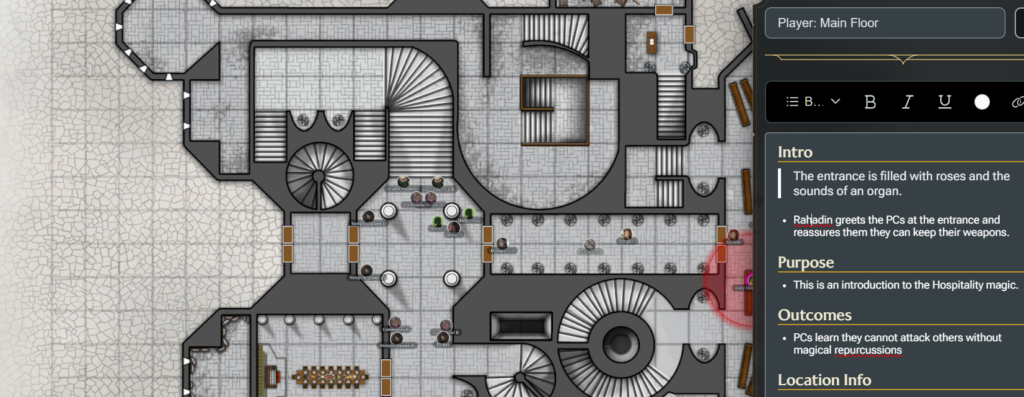
D&D Beyond’s Scene Prep puts map and scene notes close to the action. The new Stygian Labyrinth Scene Prep Workbook makes it faster to draft that material in Google Sheets, organize it across several scenes, and move clean text into Maps when you are ready to run.
The workbook does not replace Scene Prep. It gives you a better workbench for building it.
Google will prompt you to create your own editable copy in Drive.
What the workbook gives you
Map-level preparation
Draft the map name, introduction, purpose, likely outcomes, location information, and the activities or interactions that matter. A generated output cell assembles those fields into a clean block for the top-level map entry.
Scene-level preparation
Build each scene with a name, summary, read-aloud text, starting information, purpose, outcomes, location details, and possible interactions. The workbook keeps those pieces separate while you write, then combines them for copying.
Automatic scene summaries
Match each scene to its map and the workbook rolls the scene names and short descriptions into the map’s Scene Summaries section. You can prepare several scenes without manually rebuilding the map overview every time something changes.
A field guide and worked example
The workbook includes a Start Here tab, prompt guidance, and example rows so you can understand the workflow before replacing the sample material with your own campaign.
A practical bridge into Scene Prep
When we first examined Scene Prep, we argued that the best tool for running a game is not always the best tool for creating it. Spreadsheets are unusually good at structured drafting, repeated fields, fast revisions, and keeping a portable working copy of your campaign material.
This workbook puts that argument into practice. It does not automate D&D Beyond, bypass its controls, or claim to provide an import feature. It prepares consistently formatted text so you can copy and paste it into the map tool with less friction.
For the larger discussion about scene-level preparation, information retrieval during play, and campaign-data portability, read D&D Beyond Scene Prep and the Future of DM Preparation.
Use it in five steps
1. Make your copy. Open the workbook and create an editable copy in Google Drive.
2. Replace the examples. Enter one map per row on Map Prep and one scene per row on Scene Prep.
3. Match the map name exactly. That connection lets scene summaries roll up to the correct map.
4. Copy the generated output. The pale-gold output cells contain the assembled text blocks.
5. Paste into D&D Beyond Maps. Apply any native headings or read-aloud styling you want inside Scene Prep, then run the scene from the map.
Build the scene once. Keep the working copy.
The workbook is free to use. Keep a blank master, duplicate it for a campaign or adventure, and adapt the prompts to fit the way your table actually runs. When you are ready to strengthen another part of your preparation, explore more GM training tools.
The Stygian Labyrinth is an independent publication. D&D Beyond and Dungeons & Dragons are trademarks of their respective owners. This workbook is not affiliated with or endorsed by Wizards of the Coast.
Discover more from The Stygian Labyrinth
Subscribe to get the latest posts sent to your email.
2 thoughts on “New Tool: D&D Beyond Scene Prep Workbook”